
Two months ago, I bought a Samsung Odyssey G4 IPS 240Hz monitor…
I remember when I was 17 and wanted to play Osu at 240Hz so I could play better, but now that I have it, I realize that I was always the problem…

But that's not the point. I'm not here to talk about my past frustrations, but rather about my current problems.
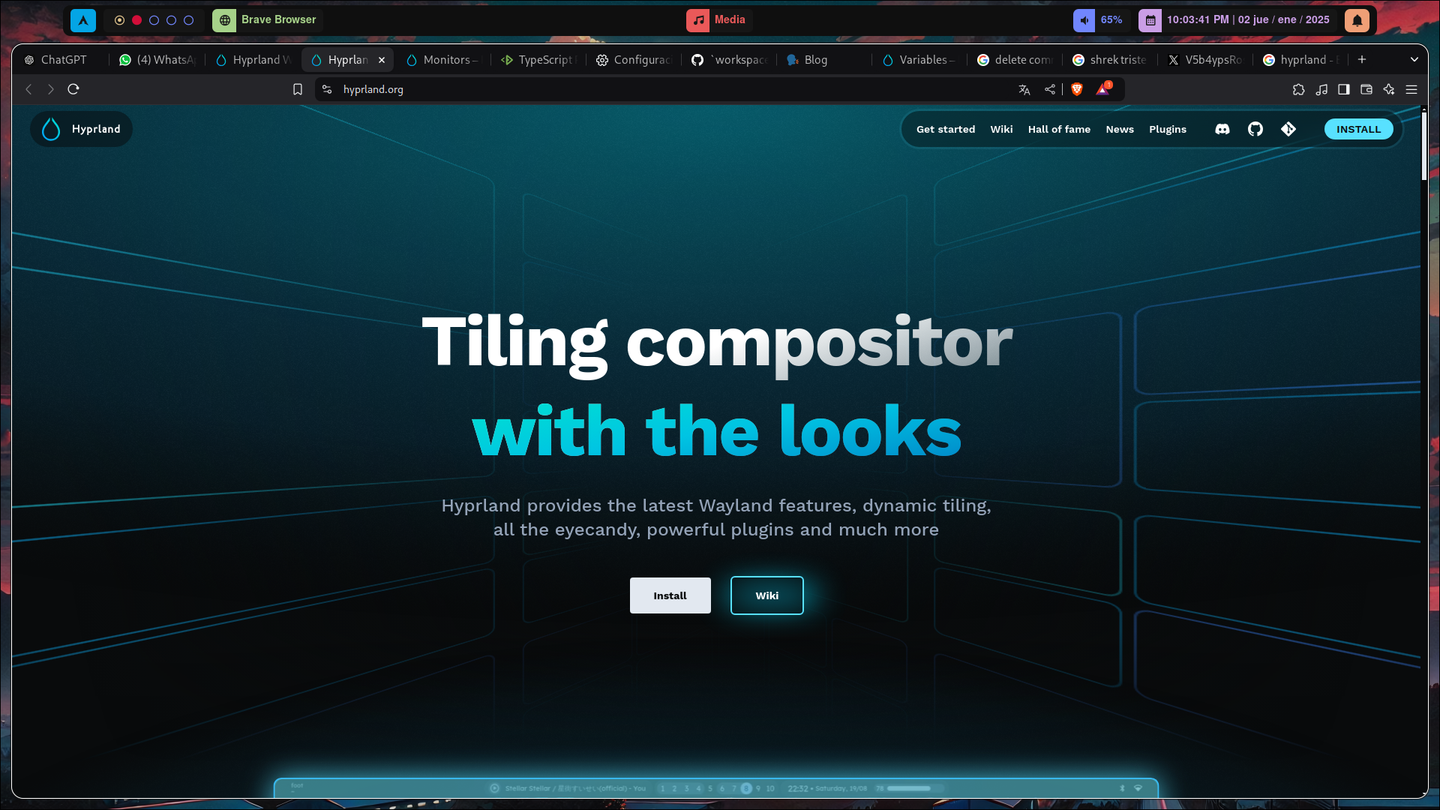
Hyprland, which I consider to be the best desktop environment—or rather, window manager. It's modern and easy to customize.
But there are a few things that could be improved. Since it's so new, there aren't many standards when it comes to the default settings—it gives you the basics, but it also gives you the tools to do whatever you want, right?
The good news is that YES, they're already trying to establish standards within the Hyprland ecosystem, such as hyprpaper, hyprpicker, hypridle, hyprlock and hyprpanel.
The latter is my favorite because it's a perfect alternative to Waybar—it offers lots of panels, pulling, and other features that give you a solid foundation for starting to edit your RICE on Hyprland and post it on r/unixporn xD
The problem here is that when I try to set up my new monitor, I realize that the Workspaces They kept changing monitors; it wasn't working now either. It worked when it worked, but it was horrible.
These are the Bash scripts I used to have.
Script for switching between workspaces:
#!/bin/bash

# Número máximo de espacios de trabajo
MAX_WORKSPACES=6

# Obtener el espacio de trabajo actual
CURRENT_WS=$(hyprctl activeworkspace -j | jq '.id' )

if [ "$1" == "next" ]; then
  # Mover al siguiente espacio de trabajo
  NEXT_WS=$((CURRENT_WS + 1))
  if [ $NEXT_WS -gt $MAX_WORKSPACES ]; then
    NEXT_WS=1
  fi
  hyprctl dispatch workspace $NEXT_WS
elif [ "$1" == "prev" ]; then
  # Mover al espacio de trabajo anterior
  PREV_WS=$((CURRENT_WS - 1))
  if [ $PREV_WS -lt 1 ]; then
    PREV_WS=$MAX_WORKSPACES
  fi
  hyprctl dispatch workspace $PREV_WS
fi
Script for moving windows between workspaces:
#!/bin/bash

# Número máximo de espacios de trabajo
MAX_WORKSPACES=6

# Obtener el espacio de trabajo actual
CURRENT_WS=$(hyprctl activeworkspace -j | jq '.id' )

if [ "$1" == "next" ]; then
  # Mover al siguiente espacio de trabajo
  NEXT_WS=$((CURRENT_WS + 1))
  if [ $NEXT_WS -gt $MAX_WORKSPACES ]; then
    NEXT_WS=1
  fi
  hyprctl dispatch movetoworkspace $NEXT_WS
elif [ "$1" == "prev" ]; then
  # Mover al espacio de trabajo anterior
  PREV_WS=$((CURRENT_WS - 1))
  if [ $PREV_WS -lt 1 ]; then
    PREV_WS=$MAX_WORKSPACES
  fi
  hyprctl dispatch movetoworkspace $PREV_WS
fi
and my Hyprland Binds:
bind = $mainMod CTRL, right, exec, ~/.config/hypr/scripts/workspace_switch.sh next
bind = $mainMod, mouse_up, exec, ~/.config/hypr/scripts/workspace_switch.sh next
bind = $mainMod CTRL, left, exec, ~/.config/hypr/scripts/workspace_switch.sh prev
bind = $mainMod, mouse_down, exec, ~/.config/hypr/scripts/workspace_switch.sh prev

bind = $mainMod SHIFT, right, exec, ~/.config/hypr/scripts/move_activity_switch.sh next
bind = $mainMod SHIFT, left, exec, ~/.config/hypr/scripts/move_activity_switch.sh prev
With this configuration, Hyprland works perfectly with one monitor, but the thing is, as I said, it looks weird with just one. So I wanted something like Windows—where, when you switch workspaces, each monitor has its own desktop.
With that in mind, I had to first translate my idea into a logical form (using a language I'm proficient in), and then into Bash.
And of course, since I'm a total nerd, I'll use TypeScript for this xD
So I start moving my Bash script to TS to implement the logic, and it ends up looking something like this
function main ( action : "next" | "prev", test_ws: number) {
  // Número máximo de espacios de trabajo
  const MAX_WORKSPACES=6

  // Obtener el espacio de trabajo actual
  const CURRENT_WS = test_ws // $(hyprctl activeworkspace -j | jq '.id' )

  if ( action == "next" ) {
    // Mover al siguiente espacio de trabajo
    let NEXT_WS = CURRENT_WS + 1
    if (NEXT_WS > MAX_WORKSPACES ) {
      NEXT_WS = 1
    }
    console.log(`Va del escritorio ${CURRENT_WS} al ${NEXT_WS}` )
    console.log("hyprctl dispatch workspace $NEXT_WS")
  } else if ( action == "prev" ) {
    // Mover al espacio de trabajo anterior
    let PREV_WS = CURRENT_WS - 1
    if ( PREV_WS < 1 ) {
      PREV_WS = MAX_WORKSPACES
    }
    console.log(`Va del escritorio ${CURRENT_WS} al ${PREV_WS}` )
    console.log("hyprctl dispatch workspace $PREV_WS")
  }
}
And after half an hour, I already had the raw logic.
function main2 ( action : "next" | "prev", test_ws: number) {
  // Número máximo de espacios de trabajo
  const MAX_WORKSPACES=6

  const NUMBER_OF_MONITORS = 2 // Ejemplo

  // Obtener el espacio de trabajo actual
  const CURRENT_WS = test_ws // $(hyprctl activeworkspace -j | jq '.id' )
  const VIRTUAL_WS = Math.ceil(test_ws / NUMBER_OF_MONITORS)
  console.log(VIRTUAL_WS)
  const IS_LAST_MONITOR_FOCUSED = VIRTUAL_WS === test_ws / NUMBER_OF_MONITORS

  if (action == "next" ) {
    console.log("Va al workspace N° " + (VIRTUAL_WS + 1))

    if(!IS_LAST_MONITOR_FOCUSED) {
	    /* esto suponiendo de solo 2 monitores,
	    porque si es de 3 o 1 se tendria que hacer
	    un array de los escritorios raw actuales,
	    si es de 3, y esta en el VirtualWorkSpace N°3
	    tendria actualmente el [7,8,9], en el caso
	    de 1 [3] en el caso de 2 [5,6], en el caso
	    de 4 [9,10,11,12] siempre dejando al focus
	    de ultimo */
      console.log(`El monitor 2 va del escritorio raw ${CURRENT_WS + 1} al ${CURRENT_WS + 1 + NUMBER_OF_MONITORS}` )
      console.log(`El monitor 1(focus) va del escritorio raw ${CURRENT_WS} al ${CURRENT_WS + NUMBER_OF_MONITORS}` )
    } else {
      console.log(`El monitor 1 va del escritorio raw ${CURRENT_WS} al ${CURRENT_WS + NUMBER_OF_MONITORS}` )
      console.log(`El monitor 2(focus) va del escritorio raw ${CURRENT_WS + 1} al ${CURRENT_WS + 1 + NUMBER_OF_MONITORS}` )
    }
  } else if ( action == "prev" ){
    console.log("Va al workspace N° " + (VIRTUAL_WS - 1))

    if(VIRTUAL_WS > test_ws / NUMBER_OF_MONITORS) {
      console.log(`El monitor 2 va del escritorio raw ${CURRENT_WS + 1} al ${CURRENT_WS + 1 - NUMBER_OF_MONITORS}` )
      console.log(`El monitor 1(focus) va del escritorio raw ${CURRENT_WS} al ${CURRENT_WS - NUMBER_OF_MONITORS}` )
    } else {
      console.log(`El monitor 1 va del escritorio raw ${CURRENT_WS - 1} al ${CURRENT_WS - NUMBER_OF_MONITORS - 1}` )
      console.log(`El monitor 2(focus) va del escritorio raw ${CURRENT_WS} al ${CURRENT_WS - NUMBER_OF_MONITORS}` )
    }
  }
}
Yeah, it was really ugly—it was time to refactor it—and who better than artificial intelligence? The answers were a little off, but with a few minor adjustments, they worked out just fine for me, like this:
function main3(action: "next" | "prev", ws_raw_focus: number) {
  const MAX_WORKSPACES = 6;
  const NUMBER_OF_MONITORS = 2;

  const VIRTUAL_WS = Math.ceil(ws_raw_focus / NUMBER_OF_MONITORS);
  const targetVirtualWS = action === "next" ? VIRTUAL_WS + 1 : VIRTUAL_WS - 1;

  console.log(Va del workspace N° ${VIRTUAL_WS} al N° ${targetVirtualWS});

  const wsOffset = action === "next" ? NUMBER_OF_MONITORS : -NUMBER_OF_MONITORS;

  // Cálculo directo del workspace no enfocado
  const ws_raw_non_focus = ws_raw_focus % NUMBER_OF_MONITORS === 0 ? ws_raw_focus - 1 : ws_raw_focus + 1;
  const MONITOR_FOCUSED = ws_raw_focus % NUMBER_OF_MONITORS === 0 ? 2 : 1;
  const MONITOR_NONFOCUSED = ws_raw_non_focus % NUMBER_OF_MONITORS === 0 ? 2 : 1;

  console.log(El monitor focus es el monitor: ${MONITOR_FOCUSED});
  console.log(El monitor ${MONITOR_NONFOCUSED} va del escritorio raw ${ws_raw_non_focus} al ${ws_raw_non_focus + wsOffset});
  console.log(El monitor ${MONITOR_FOCUSED}(focus) va del escritorio raw ${ws_raw_focus} al ${ws_raw_focus + wsOffset});
}
A really drastic change, without if and all those three-part lines xD
With that done, I was ready to transfer it to Bash, which I also ended up asking claude.ai and also correcting it so that it reads as follows:
#!/bin/bash

#MAX_WORKSPACES=6
NUMBER_OF_MONITORS=2

ACTION=$1
WS_RAW_FOCUS=$(hyprctl activeworkspace -j | jq '.id' )

VIRTUAL_WS=$(( (WS_RAW_FOCUS + NUMBER_OF_MONITORS - 1) / NUMBER_OF_MONITORS ))

if [ "$ACTION" == "next" ]; then
    TARGET_VIRTUAL_WS=$((VIRTUAL_WS + 1))
    WS_OFFSET=$NUMBER_OF_MONITORS
else
    TARGET_VIRTUAL_WS=$((VIRTUAL_WS - 1))
    WS_OFFSET=$((-NUMBER_OF_MONITORS))
fi

if [ $((WS_RAW_FOCUS % NUMBER_OF_MONITORS)) -eq 0 ]; then
    WS_RAW_NON_FOCUS=$((WS_RAW_FOCUS - 1))
    MONITOR_FOCUSED=2
else
    WS_RAW_NON_FOCUS=$((WS_RAW_FOCUS + 1))
    MONITOR_FOCUSED=1
fi

MONITOR_NONFOCUSED=$((3 - MONITOR_FOCUSED))

echo "El monitor $MONITOR_NONFOCUSED va del escritorio raw $WS_RAW_NON_FOCUS al $((WS_RAW_NON_FOCUS + WS_OFFSET))"
hyprctl dispatch workspace $((WS_RAW_NON_FOCUS + WS_OFFSET))
echo "El monitor $MONITOR_FOCUSED(focus) va del escritorio raw $WS_RAW_FOCUS al $((WS_RAW_FOCUS + WS_OFFSET))"
hyprctl dispatch workspace $((WS_RAW_FOCUS + WS_OFFSET))
That took care of the logic, but I still had a problem: I was doing it by switching the focus between monitors. Now I needed to figure out how to set the focus on a specific monitor, and I didn't think AI would be much help with that, since it doesn't know much about the technical documentation for something as specific as a relatively modern window manager, so I had to go to the Hyprland community’s Discord forum and read Hyprland’s documentation on hyprctl Meanwhile, while someone was reading about my situation.
In the end, I found this:
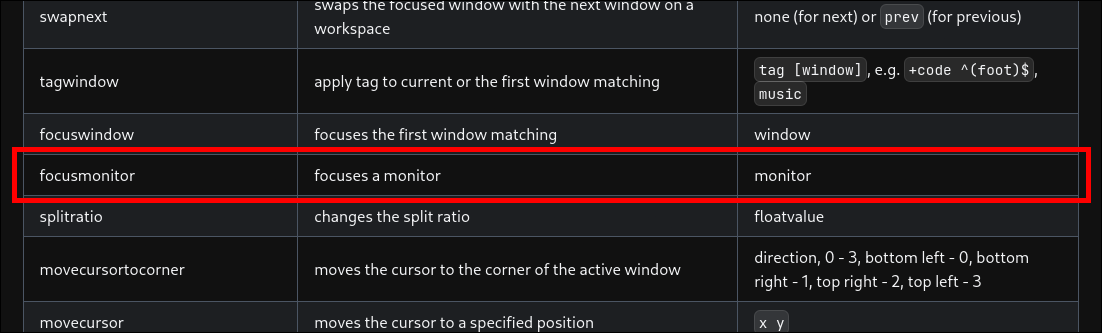
Yes, there was the solution in the list of dispatchers from hyprctl, that's what I meant—Hyprland gives you the tools to do it yourself xD
And now, let's move on to something functional:
#!/bin/bash

# Number of monitors
NUMBER_OF_MONITORS=2

# Action (next/prev)
ACTION=$1

# Get current focused workspace ID
WS_RAW_FOCUS=$(hyprctl activeworkspace -j | jq -r '.id')

# Calculate virtual workspace number
VIRTUAL_WS=$(( (WS_RAW_FOCUS + NUMBER_OF_MONITORS - 1) / NUMBER_OF_MONITORS ))

# Calculate offset based on action
if [ "$ACTION" == "next" ]; then
   TARGET_VIRTUAL_WS=$((VIRTUAL_WS + 1))
   WS_OFFSET=$NUMBER_OF_MONITORS
else
   TARGET_VIRTUAL_WS=$((VIRTUAL_WS - 1))
   WS_OFFSET=$((-NUMBER_OF_MONITORS))
fi

# Calculate non-focused workspace and determine which monitor is focused
if [ $((WS_RAW_FOCUS % NUMBER_OF_MONITORS)) -eq 0 ]; then
   WS_RAW_NON_FOCUS=$((WS_RAW_FOCUS - 1))
   MONITOR_FOCUSED_INDEX=1
   MONITOR_FOCUSED="HDMI-A-1"
   MONITOR_NONFOCUSED="DP-1"
else
   WS_RAW_NON_FOCUS=$((WS_RAW_FOCUS + 1))
   MONITOR_FOCUSED_INDEX=0
   MONITOR_FOCUSED="DP-1"
   MONITOR_NONFOCUSED="HDMI-A-1"
fi

# Commands
hyprctl dispatch focusmonitor $MONITOR_NONFOCUSED
hyprctl dispatch workspace $((WS_RAW_NON_FOCUS + WS_OFFSET))
hyprctl dispatch focusmonitor $MONITOR_FOCUSED
hyprctl dispatch workspace $((WS_RAW_FOCUS + WS_OFFSET))
At this point, it's already up and running, and you can use it for an unlimited number of workspaces that have two monitors, specifically DP-1 and HDMI-A-1.
Yes, very specific, but “It works on my computer” xD
Now, to improve it, I want to set a limit of Virtual Workspaces In my case, just 5—that's more than enough for me.
#!/bin/bash

# Number of monitors
NUMBER_OF_MONITORS=2

# Maximum virtual workspace
MAX_VIRTUAL_WS=5

# Action (next/prev)
ACTION=$1

# Get current focused workspace ID
WS_RAW_FOCUS=$(hyprctl activeworkspace -j | jq -r '.id')

# Calculate virtual workspace number
VIRTUAL_WS=$(( (WS_RAW_FOCUS + NUMBER_OF_MONITORS - 1) / NUMBER_OF_MONITORS ))

# Calculate offset based on action and handle wrapping
if [ "$ACTION" == "next" ]; then
    TARGET_VIRTUAL_WS=$((VIRTUAL_WS + 1))
    if [ $TARGET_VIRTUAL_WS -gt $MAX_VIRTUAL_WS ]; then
        TARGET_VIRTUAL_WS=1
        WS_OFFSET=$(( (1 - MAX_VIRTUAL_WS) * NUMBER_OF_MONITORS ))
    else
        WS_OFFSET=$NUMBER_OF_MONITORS
    fi
else
    TARGET_VIRTUAL_WS=$((VIRTUAL_WS - 1))
    if [ $TARGET_VIRTUAL_WS -lt 1 ]; then
        TARGET_VIRTUAL_WS=$MAX_VIRTUAL_WS
        WS_OFFSET=$(( (MAX_VIRTUAL_WS - 1) * NUMBER_OF_MONITORS ))
    else
        WS_OFFSET=$((-NUMBER_OF_MONITORS))
    fi
fi

# Calculate non-focused workspace and determine which monitor is focused
if [ $((WS_RAW_FOCUS % NUMBER_OF_MONITORS)) -eq 0 ]; then
    WS_RAW_NON_FOCUS=$((WS_RAW_FOCUS - 1))
    MONITOR_FOCUSED_INDEX=1
    MONITOR_FOCUSED="HDMI-A-1"
    MONITOR_NONFOCUSED="DP-1"
else
    WS_RAW_NON_FOCUS=$((WS_RAW_FOCUS + 1))
    MONITOR_FOCUSED_INDEX=0
    MONITOR_FOCUSED="DP-1"
    MONITOR_NONFOCUSED="HDMI-A-1"
fi

# Commands
hyprctl dispatch focusmonitor $MONITOR_NONFOCUSED
hyprctl dispatch workspace $((WS_RAW_NON_FOCUS + WS_OFFSET))
hyprctl dispatch focusmonitor $MONITOR_FOCUSED
hyprctl dispatch workspace $((WS_RAW_FOCUS + WS_OFFSET))
I added some validations for the required offset and a constant of Virtual Workspaces maximum—in my case, 5.
With this, I think I now have a solid development environment to move my developer side over here, because… there were a few issues with Windows and Rust when I was setting up a server xD.
But that's a story for my next article.
Final Result
After that, I finally managed to come up with three scripts—one for a single monitor, another for two, and the third for three—after spending an afternoon on it. Obviously, the more specific the script, the more efficient it is.
workspace_single.sh
#!/bin/bash

# Número máximo de espacios de trabajo
MAX_WORKSPACES=6

# Obtener el espacio de trabajo actual
CURRENT_WS=$(hyprctl activeworkspace -j | jq '.id' )

if [ "$1" == "next" ]; then
  # Mover al siguiente espacio de trabajo
  NEXT_WS=$((CURRENT_WS + 1))
  if [ $NEXT_WS -gt $MAX_WORKSPACES ]; then
    NEXT_WS=1
  fi
  hyprctl dispatch workspace $NEXT_WS
elif [ "$1" == "prev" ]; then
  # Mover al espacio de trabajo anterior
  PREV_WS=$((CURRENT_WS - 1))
  if [ $PREV_WS -lt 1 ]; then
    PREV_WS=$MAX_WORKSPACES
  fi
  hyprctl dispatch workspace $PREV_WS
fi
workspace_dual.sh
#!/bin/bash

# Número de monitores conectados
NUMBER_OF_MONITORS=2

# Máximo número de workspaces virtuales
MAX_VIRTUAL_WS=5

# Acción (next/prev)
ACTION=$1

# Obtener ID del workspace actualmente enfocado
WS_RAW_FOCUS=$(hyprctl activeworkspace -j | jq -r '.id')

# Calcular el número del workspace virtual
VIRTUAL_WS=$(( (WS_RAW_FOCUS + NUMBER_OF_MONITORS - 1) / NUMBER_OF_MONITORS ))

# Obtener los IDs de los monitores
MONITORS=($(hyprctl monitors -j | jq -r '.[].name'))

# Identificar los monitores enfocado y no enfocado
if [ $((WS_RAW_FOCUS % NUMBER_OF_MONITORS)) -eq 0 ]; then
  WS_RAW_NON_FOCUS=$((WS_RAW_FOCUS - 1))
  MONITOR_FOCUSED_INDEX=1
else
  WS_RAW_NON_FOCUS=$((WS_RAW_FOCUS + 1))
  MONITOR_FOCUSED_INDEX=0
fi
MONITOR_FOCUSED=${MONITORS[$MONITOR_FOCUSED_INDEX]}
MONITOR_NONFOCUSED=${MONITORS[$((1 - MONITOR_FOCUSED_INDEX))]}

# Calcular el offset del workspace según la acción y manejar el wrap
if [ "$ACTION" == "next" ]; then
  TARGET_VIRTUAL_WS=$((VIRTUAL_WS + 1))
  if [ $TARGET_VIRTUAL_WS -gt $MAX_VIRTUAL_WS ]; then
    TARGET_VIRTUAL_WS=1
    WS_OFFSET=$(( (1 - MAX_VIRTUAL_WS) * NUMBER_OF_MONITORS ))
  else
    WS_OFFSET=$NUMBER_OF_MONITORS
  fi
else
  TARGET_VIRTUAL_WS=$((VIRTUAL_WS - 1))
  if [ $TARGET_VIRTUAL_WS -lt 1 ]; then
    TARGET_VIRTUAL_WS=$MAX_VIRTUAL_WS
    WS_OFFSET=$(( (MAX_VIRTUAL_WS - 1) * NUMBER_OF_MONITORS ))
  else
    WS_OFFSET=$((-NUMBER_OF_MONITORS))
  fi
fi

# Enviar comandos
hyprctl dispatch focusmonitor $MONITOR_NONFOCUSED
hyprctl dispatch workspace $((WS_RAW_NON_FOCUS + WS_OFFSET))
hyprctl dispatch focusmonitor $MONITOR_FOCUSED
hyprctl dispatch workspace $((WS_RAW_FOCUS + WS_OFFSET))
workspace_multi.sh
#!/bin/bash

# Número de monitores conectados
NUMBER_OF_MONITORS=$(hyprctl monitors -j | jq '. | length')

# Máximo número de workspaces virtuales
MAX_VIRTUAL_WS=5

# Acción (next/prev)
ACTION=$1

# Obtener ID del workspace actualmente enfocado
WS_RAW_FOCUS=$(hyprctl activeworkspace -j | jq -r '.id')

# Calcular el número del workspace virtual actual
VIRTUAL_WS=$(( (WS_RAW_FOCUS + NUMBER_OF_MONITORS - 1) / NUMBER_OF_MONITORS ))

# Obtener los IDs de los monitores
MONITORS=($(hyprctl monitors -j | jq -r '.[].name'))

# Calcular el workspace virtual objetivo y el offset
if [ "$ACTION" == "next" ]; then
    TARGET_VIRTUAL_WS=$((VIRTUAL_WS + 1))
    if [ $TARGET_VIRTUAL_WS -gt $MAX_VIRTUAL_WS ]; then
        TARGET_VIRTUAL_WS=1
        WS_OFFSET=$(( (1 - MAX_VIRTUAL_WS) * NUMBER_OF_MONITORS ))
    else
        WS_OFFSET=$NUMBER_OF_MONITORS
    fi
else
    TARGET_VIRTUAL_WS=$((VIRTUAL_WS - 1))
    if [ $TARGET_VIRTUAL_WS -lt 1 ]; then
        TARGET_VIRTUAL_WS=$MAX_VIRTUAL_WS
        WS_OFFSET=$(( (MAX_VIRTUAL_WS - 1) * NUMBER_OF_MONITORS ))
    else
        WS_OFFSET=$((-NUMBER_OF_MONITORS))
    fi
fi

# Guardar monitor focuseado y su workspace objetivo
CURRENT_FOCUSED_MONITOR=$(hyprctl activeworkspace -j | jq -r '.monitor')
FOCUSED_TARGET_WS=0

# Primero mover todos los monitores no focuseados
for ((i=0; i<NUMBER_OF_MONITORS; i++)); do
    MONITOR=${MONITORS[$i]}
    WS_RAW_CURRENT=$((VIRTUAL_WS * NUMBER_OF_MONITORS - (NUMBER_OF_MONITORS - 1) + i))
    TARGET_WS=$((WS_RAW_CURRENT + WS_OFFSET))

    if [ "$MONITOR" == "$CURRENT_FOCUSED_MONITOR" ]; then
        # Guardar para ejecutar al final
        FOCUSED_TARGET_WS=$TARGET_WS
    else
        hyprctl dispatch focusmonitor "$MONITOR"
        hyprctl dispatch workspace $TARGET_WS
    fi
done

# Finalmente mover el monitor focuseado
hyprctl dispatch focusmonitor "$CURRENT_FOCUSED_MONITOR"
hyprctl dispatch workspace $FOCUSED_TARGET_WS
And finally, this would be the configuration for hyprland.conf
###################
### MY PROGRAMS ###
###################

# See https://wiki.hyprland.org/Configuring/Keywords/

# ...

# Move between workspaces
#$WORKSPACES_SWITCHER = ~/.config/hypr/scripts/workspace_single.sh # For single monitor
$WORKSPACES_SWITCHER = ~/.config/hypr/scripts/workspace_dual.sh # For dual monitor
#WORKSPACES_SWITCHER =~/.config/hypr/scripts/workspace_multi.sh # For multi monitor

# Move windows between workspaces
#$MOVE_WINDOW = ~/.config/hypr/scripts/move_activity_single.sh # For single monitor
$MOVE_WINDOW = ~/.config/hypr/scripts/move_activity_dual.sh # For dual monitor
#MOVE_WINDOW =~/.config/hypr/scripts/move_activity_multi.sh # For multi monitor

###################
### KEYBINDINGS ###
###################

# See https://wiki.hyprland.org/Configuring/Keywords/

# ...

# Scroll through existing workspaces with mainMod + scroll / arrows
bind = $mainMod CTRL, right, exec, $WORKSPACES_SWITCHER next
bind = $mainMod, mouse_up, exec, $WORKSPACES_SWITCHER next
bind = $mainMod CTRL, left, exec, $WORKSPACES_SWITCHER prev
bind = $mainMod, mouse_down, exec, $WORKSPACES_SWITCHER prev

bind = $mainMod SHIFT, right, exec, $MOVE_WINDOW next
bind = $mainMod SHIFT, left, exec, $MOVE_WINDOW prev