
Hace ya 2 meses me compre un monitor Samsung Odyssey G4 IPS 240hz…
Que recuerdos cuando tenia 17 y quería jugar Osu a 240hz para jugar mejor, pero ahora que lo tengo me doy cuenta que siempre fui yo el del problema…

Pero ese no es el tema. No estoy aquí para contar mis frustraciones del pasado, si no por mis problemas presente.
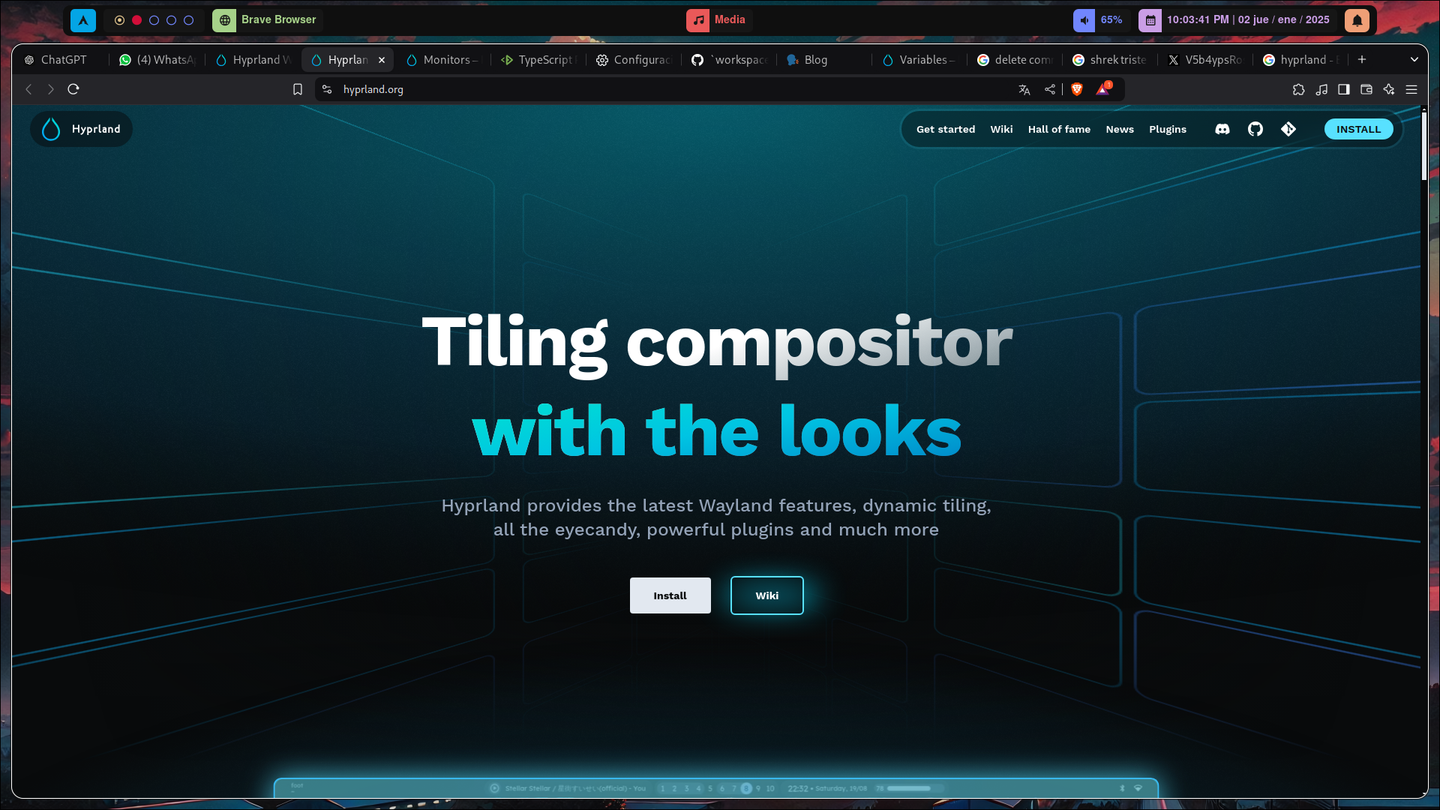
Hyprland, el que para mi es el mejor Desktop o mejor dicho Window Manager. Moderno y fácil de customizar.
Pero tiene algunas cositas a mejorar, como es tan nuevo no hay tantos estándares en cuanto a la configuración default, te da lo básico, y también te da las herramientas para que hagas tu lo que quieras, no?
Lo bueno es que SI, ya están tratando de hacer estándares dentro del ecosistema de hyprland como hyprpaper, hyprpicker, hypridle, hyprlock y hyprpanel.
Este ultimo siendo mi preferido al ser una alternativa a Waybar perfecto ya que te trae muchos paneles, pulling y de mas cosas que te da una buena base para comenzar a editar tu RICE en Hyprland y publicarlo en r/unixporn xD
El problema acá es cuando trato de complementar mi nuevo monitor acá, me daba cuenta que las Workspaces se cambiaban de monitores, tampoco serbia ahora. De que funcionaba, funcionaba, pero era horrible.
Estos son mis scripts bash que antes tenia.
Script para el movimiento entre Workspaces:
#!/bin/bash

# Número máximo de espacios de trabajo
MAX_WORKSPACES=6

# Obtener el espacio de trabajo actual
CURRENT_WS=$(hyprctl activeworkspace -j | jq '.id' )

if [ "$1" == "next" ]; then
  # Mover al siguiente espacio de trabajo
  NEXT_WS=$((CURRENT_WS + 1))
  if [ $NEXT_WS -gt $MAX_WORKSPACES ]; then
    NEXT_WS=1
  fi
  hyprctl dispatch workspace $NEXT_WS
elif [ "$1" == "prev" ]; then
  # Mover al espacio de trabajo anterior
  PREV_WS=$((CURRENT_WS - 1))
  if [ $PREV_WS -lt 1 ]; then
    PREV_WS=$MAX_WORKSPACES
  fi
  hyprctl dispatch workspace $PREV_WS
fi
Script para el movimiento de ventanas entre Workspaces:
#!/bin/bash

# Número máximo de espacios de trabajo
MAX_WORKSPACES=6

# Obtener el espacio de trabajo actual
CURRENT_WS=$(hyprctl activeworkspace -j | jq '.id' )

if [ "$1" == "next" ]; then
  # Mover al siguiente espacio de trabajo
  NEXT_WS=$((CURRENT_WS + 1))
  if [ $NEXT_WS -gt $MAX_WORKSPACES ]; then
    NEXT_WS=1
  fi
  hyprctl dispatch movetoworkspace $NEXT_WS
elif [ "$1" == "prev" ]; then
  # Mover al espacio de trabajo anterior
  PREV_WS=$((CURRENT_WS - 1))
  if [ $PREV_WS -lt 1 ]; then
    PREV_WS=$MAX_WORKSPACES
  fi
  hyprctl dispatch movetoworkspace $PREV_WS
fi
y mis Binds de Hyprland:
bind = $mainMod CTRL, right, exec, ~/.config/hypr/scripts/workspace_switch.sh next
bind = $mainMod, mouse_up, exec, ~/.config/hypr/scripts/workspace_switch.sh next
bind = $mainMod CTRL, left, exec, ~/.config/hypr/scripts/workspace_switch.sh prev
bind = $mainMod, mouse_down, exec, ~/.config/hypr/scripts/workspace_switch.sh prev

bind = $mainMod SHIFT, right, exec, ~/.config/hypr/scripts/move_activity_switch.sh next
bind = $mainMod SHIFT, left, exec, ~/.config/hypr/scripts/move_activity_switch.sh prev
Con esta configuración hyprland funciona al 100 con 1 monitor, pero la cosa es como dije, queda raro con 1. así que quería algo igual que Windows. Que al moverte de Workspace cada monitor tiene su propio desktop.
Con la idea en mente tenia que hallar una mi idea a lógica primeramente(a un lenguaje que le tenga maestría), y luego a bash.
Y claro, como son un retrasado usare TypeScript para esto xD
Así que comienzo a trasladar mi bash a TS para iniciar la lógica y quedo algo así
function main ( action : "next" | "prev", test_ws: number) {
  // Número máximo de espacios de trabajo
  const MAX_WORKSPACES=6

  // Obtener el espacio de trabajo actual
  const CURRENT_WS = test_ws // $(hyprctl activeworkspace -j | jq '.id' )

  if ( action == "next" ) {
    // Mover al siguiente espacio de trabajo
    let NEXT_WS = CURRENT_WS + 1
    if (NEXT_WS > MAX_WORKSPACES ) {
      NEXT_WS = 1
    }
    console.log(`Va del escritorio ${CURRENT_WS} al ${NEXT_WS}` )
    console.log("hyprctl dispatch workspace $NEXT_WS")
  } else if ( action == "prev" ) {
    // Mover al espacio de trabajo anterior
    let PREV_WS = CURRENT_WS - 1
    if ( PREV_WS < 1 ) {
      PREV_WS = MAX_WORKSPACES
    }
    console.log(`Va del escritorio ${CURRENT_WS} al ${PREV_WS}` )
    console.log("hyprctl dispatch workspace $PREV_WS")
  }
}
Y luego de media hora ya tenia la lógica raw.
function main2 ( action : "next" | "prev", test_ws: number) {
  // Número máximo de espacios de trabajo
  const MAX_WORKSPACES=6

  const NUMBER_OF_MONITORS = 2 // Ejemplo

  // Obtener el espacio de trabajo actual
  const CURRENT_WS = test_ws // $(hyprctl activeworkspace -j | jq '.id' )
  const VIRTUAL_WS = Math.ceil(test_ws / NUMBER_OF_MONITORS)
  console.log(VIRTUAL_WS)
  const IS_LAST_MONITOR_FOCUSED = VIRTUAL_WS === test_ws / NUMBER_OF_MONITORS

  if (action == "next" ) {
    console.log("Va al workspace N° " + (VIRTUAL_WS + 1))

    if(!IS_LAST_MONITOR_FOCUSED) {
	    /* esto suponiendo de solo 2 monitores,
	    porque si es de 3 o 1 se tendria que hacer
	    un array de los escritorios raw actuales,
	    si es de 3, y esta en el VirtualWorkSpace N°3
	    tendria actualmente el [7,8,9], en el caso
	    de 1 [3] en el caso de 2 [5,6], en el caso
	    de 4 [9,10,11,12] siempre dejando al focus
	    de ultimo */
      console.log(`El monitor 2 va del escritorio raw ${CURRENT_WS + 1} al ${CURRENT_WS + 1 + NUMBER_OF_MONITORS}` )
      console.log(`El monitor 1(focus) va del escritorio raw ${CURRENT_WS} al ${CURRENT_WS + NUMBER_OF_MONITORS}` )
    } else {
      console.log(`El monitor 1 va del escritorio raw ${CURRENT_WS} al ${CURRENT_WS + NUMBER_OF_MONITORS}` )
      console.log(`El monitor 2(focus) va del escritorio raw ${CURRENT_WS + 1} al ${CURRENT_WS + 1 + NUMBER_OF_MONITORS}` )
    }
  } else if ( action == "prev" ){
    console.log("Va al workspace N° " + (VIRTUAL_WS - 1))

    if(VIRTUAL_WS > test_ws / NUMBER_OF_MONITORS) {
      console.log(`El monitor 2 va del escritorio raw ${CURRENT_WS + 1} al ${CURRENT_WS + 1 - NUMBER_OF_MONITORS}` )
      console.log(`El monitor 1(focus) va del escritorio raw ${CURRENT_WS} al ${CURRENT_WS - NUMBER_OF_MONITORS}` )
    } else {
      console.log(`El monitor 1 va del escritorio raw ${CURRENT_WS - 1} al ${CURRENT_WS - NUMBER_OF_MONITORS - 1}` )
      console.log(`El monitor 2(focus) va del escritorio raw ${CURRENT_WS} al ${CURRENT_WS - NUMBER_OF_MONITORS}` )
    }
  }
}
Si, muy feo, era tiempo de refactorizarlo, y quien mejor que la inteligencia artificial, las respuestas eran algo erróneas pero con pequeños ajustes quedándome bien, así:
function main3(action: "next" | "prev", ws_raw_focus: number) {
  const MAX_WORKSPACES = 6;
  const NUMBER_OF_MONITORS = 2;

  const VIRTUAL_WS = Math.ceil(ws_raw_focus / NUMBER_OF_MONITORS);
  const targetVirtualWS = action === "next" ? VIRTUAL_WS + 1 : VIRTUAL_WS - 1;

  console.log(Va del workspace N° ${VIRTUAL_WS} al N° ${targetVirtualWS});

  const wsOffset = action === "next" ? NUMBER_OF_MONITORS : -NUMBER_OF_MONITORS;

  // Cálculo directo del workspace no enfocado
  const ws_raw_non_focus = ws_raw_focus % NUMBER_OF_MONITORS === 0 ? ws_raw_focus - 1 : ws_raw_focus + 1;
  const MONITOR_FOCUSED = ws_raw_focus % NUMBER_OF_MONITORS === 0 ? 2 : 1;
  const MONITOR_NONFOCUSED = ws_raw_non_focus % NUMBER_OF_MONITORS === 0 ? 2 : 1;

  console.log(El monitor focus es el monitor: ${MONITOR_FOCUSED});
  console.log(El monitor ${MONITOR_NONFOCUSED} va del escritorio raw ${ws_raw_non_focus} al ${ws_raw_non_focus + wsOffset});
  console.log(El monitor ${MONITOR_FOCUSED}(focus) va del escritorio raw ${ws_raw_focus} al ${ws_raw_focus + wsOffset});
}
Un cambio muy brutal, sin if y full ternarias xD
Con esto listo ya estaba listo para pasarlo a bash lo cual también termine pidiéndole a claude.ai y también corrigiéndolo quedando así:
#!/bin/bash

#MAX_WORKSPACES=6
NUMBER_OF_MONITORS=2

ACTION=$1
WS_RAW_FOCUS=$(hyprctl activeworkspace -j | jq '.id' )

VIRTUAL_WS=$(( (WS_RAW_FOCUS + NUMBER_OF_MONITORS - 1) / NUMBER_OF_MONITORS ))

if [ "$ACTION" == "next" ]; then
    TARGET_VIRTUAL_WS=$((VIRTUAL_WS + 1))
    WS_OFFSET=$NUMBER_OF_MONITORS
else
    TARGET_VIRTUAL_WS=$((VIRTUAL_WS - 1))
    WS_OFFSET=$((-NUMBER_OF_MONITORS))
fi

if [ $((WS_RAW_FOCUS % NUMBER_OF_MONITORS)) -eq 0 ]; then
    WS_RAW_NON_FOCUS=$((WS_RAW_FOCUS - 1))
    MONITOR_FOCUSED=2
else
    WS_RAW_NON_FOCUS=$((WS_RAW_FOCUS + 1))
    MONITOR_FOCUSED=1
fi

MONITOR_NONFOCUSED=$((3 - MONITOR_FOCUSED))

echo "El monitor $MONITOR_NONFOCUSED va del escritorio raw $WS_RAW_NON_FOCUS al $((WS_RAW_NON_FOCUS + WS_OFFSET))"
hyprctl dispatch workspace $((WS_RAW_NON_FOCUS + WS_OFFSET))
echo "El monitor $MONITOR_FOCUSED(focus) va del escritorio raw $WS_RAW_FOCUS al $((WS_RAW_FOCUS + WS_OFFSET))"
hyprctl dispatch workspace $((WS_RAW_FOCUS + WS_OFFSET))
Con esto ya esta la lógica, pero aun tenia un problema, lo hacia cambiando los monitores del monitor focus, ahora necesitaba saber como hacerle focus a un monitor en especifico y eso no ve iba a ayudar la IA ya que ellos no saben tanto de documentación técnica de algo tan especifico como un window manager relativamente moderno, así que toco ir al foro de Discord de la comunidad de hyprland y leer la documentación de Hyprland sobre hyprctl por mientras mientras alguien leía mi situación.
Al final encontré esto:
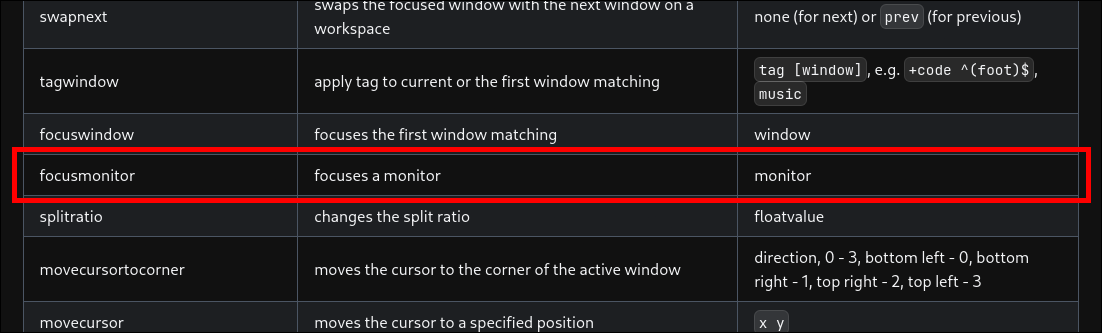
Si, ahí estaba la solución en la lista de dispatchers de hyprctl, a esto me refería que Hyprland te da las herramientas para que lo hagas por ti mismo xD
Y ahora si llegando a algo funcional:
#!/bin/bash

# Number of monitors
NUMBER_OF_MONITORS=2

# Action (next/prev)
ACTION=$1

# Get current focused workspace ID
WS_RAW_FOCUS=$(hyprctl activeworkspace -j | jq -r '.id')

# Calculate virtual workspace number
VIRTUAL_WS=$(( (WS_RAW_FOCUS + NUMBER_OF_MONITORS - 1) / NUMBER_OF_MONITORS ))

# Calculate offset based on action
if [ "$ACTION" == "next" ]; then
   TARGET_VIRTUAL_WS=$((VIRTUAL_WS + 1))
   WS_OFFSET=$NUMBER_OF_MONITORS
else
   TARGET_VIRTUAL_WS=$((VIRTUAL_WS - 1))
   WS_OFFSET=$((-NUMBER_OF_MONITORS))
fi

# Calculate non-focused workspace and determine which monitor is focused
if [ $((WS_RAW_FOCUS % NUMBER_OF_MONITORS)) -eq 0 ]; then
   WS_RAW_NON_FOCUS=$((WS_RAW_FOCUS - 1))
   MONITOR_FOCUSED_INDEX=1
   MONITOR_FOCUSED="HDMI-A-1"
   MONITOR_NONFOCUSED="DP-1"
else
   WS_RAW_NON_FOCUS=$((WS_RAW_FOCUS + 1))
   MONITOR_FOCUSED_INDEX=0
   MONITOR_FOCUSED="DP-1"
   MONITOR_NONFOCUSED="HDMI-A-1"
fi

# Commands
hyprctl dispatch focusmonitor $MONITOR_NONFOCUSED
hyprctl dispatch workspace $((WS_RAW_NON_FOCUS + WS_OFFSET))
hyprctl dispatch focusmonitor $MONITOR_FOCUSED
hyprctl dispatch workspace $((WS_RAW_FOCUS + WS_OFFSET))
Hasta acá ya es funcional y puedes usarla para infinitos Workspaces que tengan 2 monitores que específicamente tengan DP-1 y HDMI-A-1.
Si, muy especifico, pero “Funciona en mi maquina” xD
Ahora para mejorarlo quiero ponerle un limitado de Virtual Workspaces en mi caso, 5 nomas, con eso me basta y sobra.
#!/bin/bash

# Number of monitors
NUMBER_OF_MONITORS=2

# Maximum virtual workspace
MAX_VIRTUAL_WS=5

# Action (next/prev)
ACTION=$1

# Get current focused workspace ID
WS_RAW_FOCUS=$(hyprctl activeworkspace -j | jq -r '.id')

# Calculate virtual workspace number
VIRTUAL_WS=$(( (WS_RAW_FOCUS + NUMBER_OF_MONITORS - 1) / NUMBER_OF_MONITORS ))

# Calculate offset based on action and handle wrapping
if [ "$ACTION" == "next" ]; then
    TARGET_VIRTUAL_WS=$((VIRTUAL_WS + 1))
    if [ $TARGET_VIRTUAL_WS -gt $MAX_VIRTUAL_WS ]; then
        TARGET_VIRTUAL_WS=1
        WS_OFFSET=$(( (1 - MAX_VIRTUAL_WS) * NUMBER_OF_MONITORS ))
    else
        WS_OFFSET=$NUMBER_OF_MONITORS
    fi
else
    TARGET_VIRTUAL_WS=$((VIRTUAL_WS - 1))
    if [ $TARGET_VIRTUAL_WS -lt 1 ]; then
        TARGET_VIRTUAL_WS=$MAX_VIRTUAL_WS
        WS_OFFSET=$(( (MAX_VIRTUAL_WS - 1) * NUMBER_OF_MONITORS ))
    else
        WS_OFFSET=$((-NUMBER_OF_MONITORS))
    fi
fi

# Calculate non-focused workspace and determine which monitor is focused
if [ $((WS_RAW_FOCUS % NUMBER_OF_MONITORS)) -eq 0 ]; then
    WS_RAW_NON_FOCUS=$((WS_RAW_FOCUS - 1))
    MONITOR_FOCUSED_INDEX=1
    MONITOR_FOCUSED="HDMI-A-1"
    MONITOR_NONFOCUSED="DP-1"
else
    WS_RAW_NON_FOCUS=$((WS_RAW_FOCUS + 1))
    MONITOR_FOCUSED_INDEX=0
    MONITOR_FOCUSED="DP-1"
    MONITOR_NONFOCUSED="HDMI-A-1"
fi

# Commands
hyprctl dispatch focusmonitor $MONITOR_NONFOCUSED
hyprctl dispatch workspace $((WS_RAW_NON_FOCUS + WS_OFFSET))
hyprctl dispatch focusmonitor $MONITOR_FOCUSED
hyprctl dispatch workspace $((WS_RAW_FOCUS + WS_OFFSET))
Se agrego algunas validaciones para el offset necesario y una constante de Virtual Workspaces máximo, en mi caso 5.
Con esto creo que ya tengo todo un buen entorno de desarrollo para mudar acá mi lado Developer, porque…. hubieron cositas con Windows y Rust al hacer un servidor xD.
Pero eso es historia para mi próximo articulo.
Resultado final
Después de esto, al final logre determinar 3 scripts, uno para un solo monitor, otro para 2, y el otro para 3 después de una tarde. Obviamente, mientras mas especifico es el script, es mas optimo.
workspace_single.sh
#!/bin/bash

# Número máximo de espacios de trabajo
MAX_WORKSPACES=6

# Obtener el espacio de trabajo actual
CURRENT_WS=$(hyprctl activeworkspace -j | jq '.id' )

if [ "$1" == "next" ]; then
  # Mover al siguiente espacio de trabajo
  NEXT_WS=$((CURRENT_WS + 1))
  if [ $NEXT_WS -gt $MAX_WORKSPACES ]; then
    NEXT_WS=1
  fi
  hyprctl dispatch workspace $NEXT_WS
elif [ "$1" == "prev" ]; then
  # Mover al espacio de trabajo anterior
  PREV_WS=$((CURRENT_WS - 1))
  if [ $PREV_WS -lt 1 ]; then
    PREV_WS=$MAX_WORKSPACES
  fi
  hyprctl dispatch workspace $PREV_WS
fi
workspace_dual.sh
#!/bin/bash

# Número de monitores conectados
NUMBER_OF_MONITORS=2

# Máximo número de workspaces virtuales
MAX_VIRTUAL_WS=5

# Acción (next/prev)
ACTION=$1

# Obtener ID del workspace actualmente enfocado
WS_RAW_FOCUS=$(hyprctl activeworkspace -j | jq -r '.id')

# Calcular el número del workspace virtual
VIRTUAL_WS=$(( (WS_RAW_FOCUS + NUMBER_OF_MONITORS - 1) / NUMBER_OF_MONITORS ))

# Obtener los IDs de los monitores
MONITORS=($(hyprctl monitors -j | jq -r '.[].name'))

# Identificar los monitores enfocado y no enfocado
if [ $((WS_RAW_FOCUS % NUMBER_OF_MONITORS)) -eq 0 ]; then
  WS_RAW_NON_FOCUS=$((WS_RAW_FOCUS - 1))
  MONITOR_FOCUSED_INDEX=1
else
  WS_RAW_NON_FOCUS=$((WS_RAW_FOCUS + 1))
  MONITOR_FOCUSED_INDEX=0
fi
MONITOR_FOCUSED=${MONITORS[$MONITOR_FOCUSED_INDEX]}
MONITOR_NONFOCUSED=${MONITORS[$((1 - MONITOR_FOCUSED_INDEX))]}

# Calcular el offset del workspace según la acción y manejar el wrap
if [ "$ACTION" == "next" ]; then
  TARGET_VIRTUAL_WS=$((VIRTUAL_WS + 1))
  if [ $TARGET_VIRTUAL_WS -gt $MAX_VIRTUAL_WS ]; then
    TARGET_VIRTUAL_WS=1
    WS_OFFSET=$(( (1 - MAX_VIRTUAL_WS) * NUMBER_OF_MONITORS ))
  else
    WS_OFFSET=$NUMBER_OF_MONITORS
  fi
else
  TARGET_VIRTUAL_WS=$((VIRTUAL_WS - 1))
  if [ $TARGET_VIRTUAL_WS -lt 1 ]; then
    TARGET_VIRTUAL_WS=$MAX_VIRTUAL_WS
    WS_OFFSET=$(( (MAX_VIRTUAL_WS - 1) * NUMBER_OF_MONITORS ))
  else
    WS_OFFSET=$((-NUMBER_OF_MONITORS))
  fi
fi

# Enviar comandos
hyprctl dispatch focusmonitor $MONITOR_NONFOCUSED
hyprctl dispatch workspace $((WS_RAW_NON_FOCUS + WS_OFFSET))
hyprctl dispatch focusmonitor $MONITOR_FOCUSED
hyprctl dispatch workspace $((WS_RAW_FOCUS + WS_OFFSET))
workspace_multi.sh
#!/bin/bash

# Número de monitores conectados
NUMBER_OF_MONITORS=$(hyprctl monitors -j | jq '. | length')

# Máximo número de workspaces virtuales
MAX_VIRTUAL_WS=5

# Acción (next/prev)
ACTION=$1

# Obtener ID del workspace actualmente enfocado
WS_RAW_FOCUS=$(hyprctl activeworkspace -j | jq -r '.id')

# Calcular el número del workspace virtual actual
VIRTUAL_WS=$(( (WS_RAW_FOCUS + NUMBER_OF_MONITORS - 1) / NUMBER_OF_MONITORS ))

# Obtener los IDs de los monitores
MONITORS=($(hyprctl monitors -j | jq -r '.[].name'))

# Calcular el workspace virtual objetivo y el offset
if [ "$ACTION" == "next" ]; then
    TARGET_VIRTUAL_WS=$((VIRTUAL_WS + 1))
    if [ $TARGET_VIRTUAL_WS -gt $MAX_VIRTUAL_WS ]; then
        TARGET_VIRTUAL_WS=1
        WS_OFFSET=$(( (1 - MAX_VIRTUAL_WS) * NUMBER_OF_MONITORS ))
    else
        WS_OFFSET=$NUMBER_OF_MONITORS
    fi
else
    TARGET_VIRTUAL_WS=$((VIRTUAL_WS - 1))
    if [ $TARGET_VIRTUAL_WS -lt 1 ]; then
        TARGET_VIRTUAL_WS=$MAX_VIRTUAL_WS
        WS_OFFSET=$(( (MAX_VIRTUAL_WS - 1) * NUMBER_OF_MONITORS ))
    else
        WS_OFFSET=$((-NUMBER_OF_MONITORS))
    fi
fi

# Guardar monitor focuseado y su workspace objetivo
CURRENT_FOCUSED_MONITOR=$(hyprctl activeworkspace -j | jq -r '.monitor')
FOCUSED_TARGET_WS=0

# Primero mover todos los monitores no focuseados
for ((i=0; i<NUMBER_OF_MONITORS; i++)); do
    MONITOR=${MONITORS[$i]}
    WS_RAW_CURRENT=$((VIRTUAL_WS * NUMBER_OF_MONITORS - (NUMBER_OF_MONITORS - 1) + i))
    TARGET_WS=$((WS_RAW_CURRENT + WS_OFFSET))

    if [ "$MONITOR" == "$CURRENT_FOCUSED_MONITOR" ]; then
        # Guardar para ejecutar al final
        FOCUSED_TARGET_WS=$TARGET_WS
    else
        hyprctl dispatch focusmonitor "$MONITOR"
        hyprctl dispatch workspace $TARGET_WS
    fi
done

# Finalmente mover el monitor focuseado
hyprctl dispatch focusmonitor "$CURRENT_FOCUSED_MONITOR"
hyprctl dispatch workspace $FOCUSED_TARGET_WS
Y ya por ultimo esta seria la configuracion de hyprland.conf
###################
### MY PROGRAMS ###
###################

# See https://wiki.hyprland.org/Configuring/Keywords/

# ...

# Move between workspaces
#$WORKSPACES_SWITCHER = ~/.config/hypr/scripts/workspace_single.sh # For single monitor
$WORKSPACES_SWITCHER = ~/.config/hypr/scripts/workspace_dual.sh # For dual monitor
#WORKSPACES_SWITCHER =~/.config/hypr/scripts/workspace_multi.sh # For multi monitor

# Move windows between workspaces
#$MOVE_WINDOW = ~/.config/hypr/scripts/move_activity_single.sh # For single monitor
$MOVE_WINDOW = ~/.config/hypr/scripts/move_activity_dual.sh # For dual monitor
#MOVE_WINDOW =~/.config/hypr/scripts/move_activity_multi.sh # For multi monitor

###################
### KEYBINDINGS ###
###################

# See https://wiki.hyprland.org/Configuring/Keywords/

# ...

# Scroll through existing workspaces with mainMod + scroll / arrows
bind = $mainMod CTRL, right, exec, $WORKSPACES_SWITCHER next
bind = $mainMod, mouse_up, exec, $WORKSPACES_SWITCHER next
bind = $mainMod CTRL, left, exec, $WORKSPACES_SWITCHER prev
bind = $mainMod, mouse_down, exec, $WORKSPACES_SWITCHER prev

bind = $mainMod SHIFT, right, exec, $MOVE_WINDOW next
bind = $mainMod SHIFT, left, exec, $MOVE_WINDOW prev